

















TubeMagic is an AI-powered YouTube pre-production tool, built by YouTube creator Matt Par. The simplest way to describe it: it helps you decide what video to make and gets it ready to upload — ideas, keyword research, scripts, titles, descriptions, tags, and even thumbnail concepts. What it does not do is record, edit, or generate your actual video. Think of it as your research and writing team, not your production studio.
1. What It Actually Solves
Every YouTuber runs into the same five walls eventually:
- What topic should I even make a video about?
- What title and thumbnail will actually get clicks?
- How do I write a script that doesn’t sound robotic?
- How do I optimize for YouTube SEO without guessing?
- How do I keep this up consistently without burning out?
TubeMagic tries to collapse all five into one dashboard — video ideas, a niche explorer, keyword research with actual search volume data, a script writer, title/description/tag generators, and an upload-optimization workflow called Warp Upload.
2. The Core Features, In Plain English
Video Ideas Generator — give it your niche or a competitor’s channel, and it suggests video topics. Good for killing the blank-page problem, but don’t use suggestions blindly — check real search demand and competitor quality yourself.
Niche Explorer — helps you find under-served sub-niches instead of oversaturated ones (useful if you’re starting a faceless channel and don’t want to compete head-on with giants).
Keyword Research — shows YouTube search volume, competition level, and its own “Magic Score.” Useful for planning, but remember: ranking also depends on click-through rate, watch time, and retention — not just the keyword in your title.
AI Script Writer — the flagship feature. You pick topic, length, tone, and audience, and it drafts a full script with hook, main points, examples, and a CTA. This genuinely saves time, but AI scripts need real editing — your actual opinion, real experience, and a stronger, more natural-sounding hook.
Title, Description & Tag Generators — fast, structured output. Best practice: generate 20-30 title options, then manually pick ones that are clear, specific, and honestly represent the video (not clickbait).
Warp Upload — upload your finished video as unlisted, paste the link into TubeMagic, and it generates a title, description, timestamps, and tags ready for you to review and publish.
Plagiarism Checker & Community Post Generator — round out the toolkit, helping you check script originality and stay visible between uploads with polls and teaser posts.
Thumbnail Generator — included, but worth knowing upfront: reviews consistently describe it as basic, with no documented A/B testing. Most serious creators still reach for Canva, Photoshop, or Midjourney for final thumbnails.
📊 What TubeMagic Is Actually Good At (vs the Alternatives)
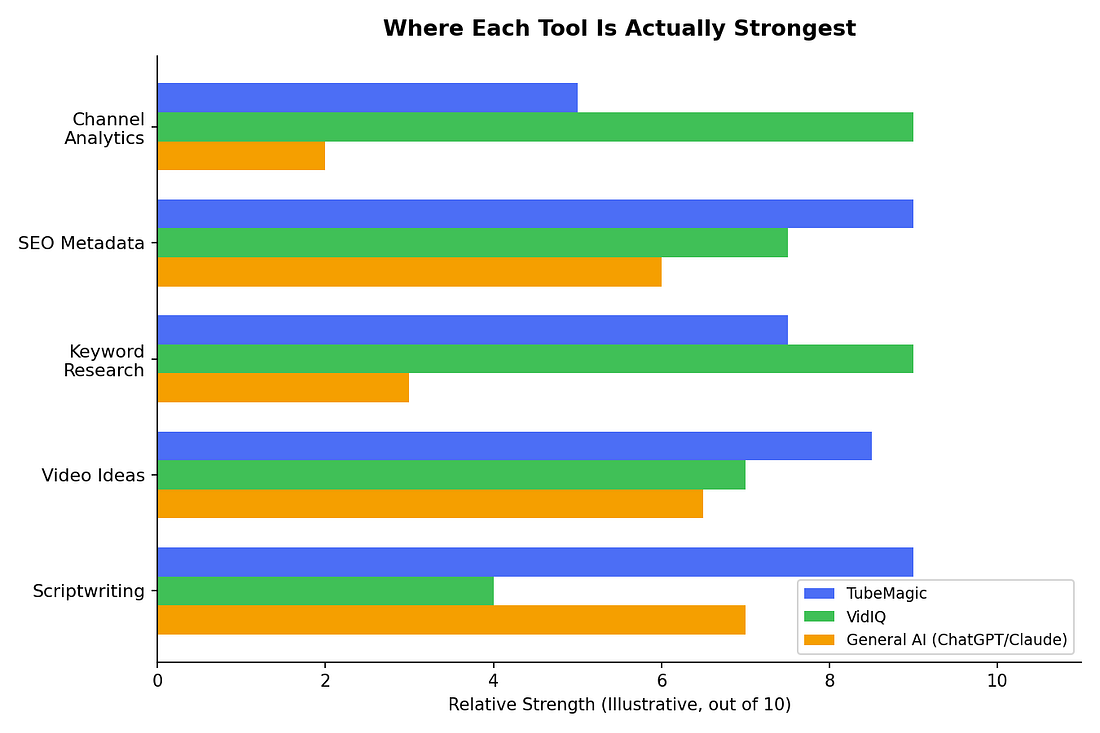
This is the honest map. TubeMagic’s strength is scriptwriting and SEO metadata — not deep analytics. VidIQ leans the opposite way, stronger on keyword data and channel analytics. A general AI chatbot like Claude or ChatGPT is flexible but lacks YouTube-specific search data built in. A lot of serious creators actually end up using a script tool and an analytics tool together, rather than expecting one to do everything.
3. The Full Workflow, Step by Step
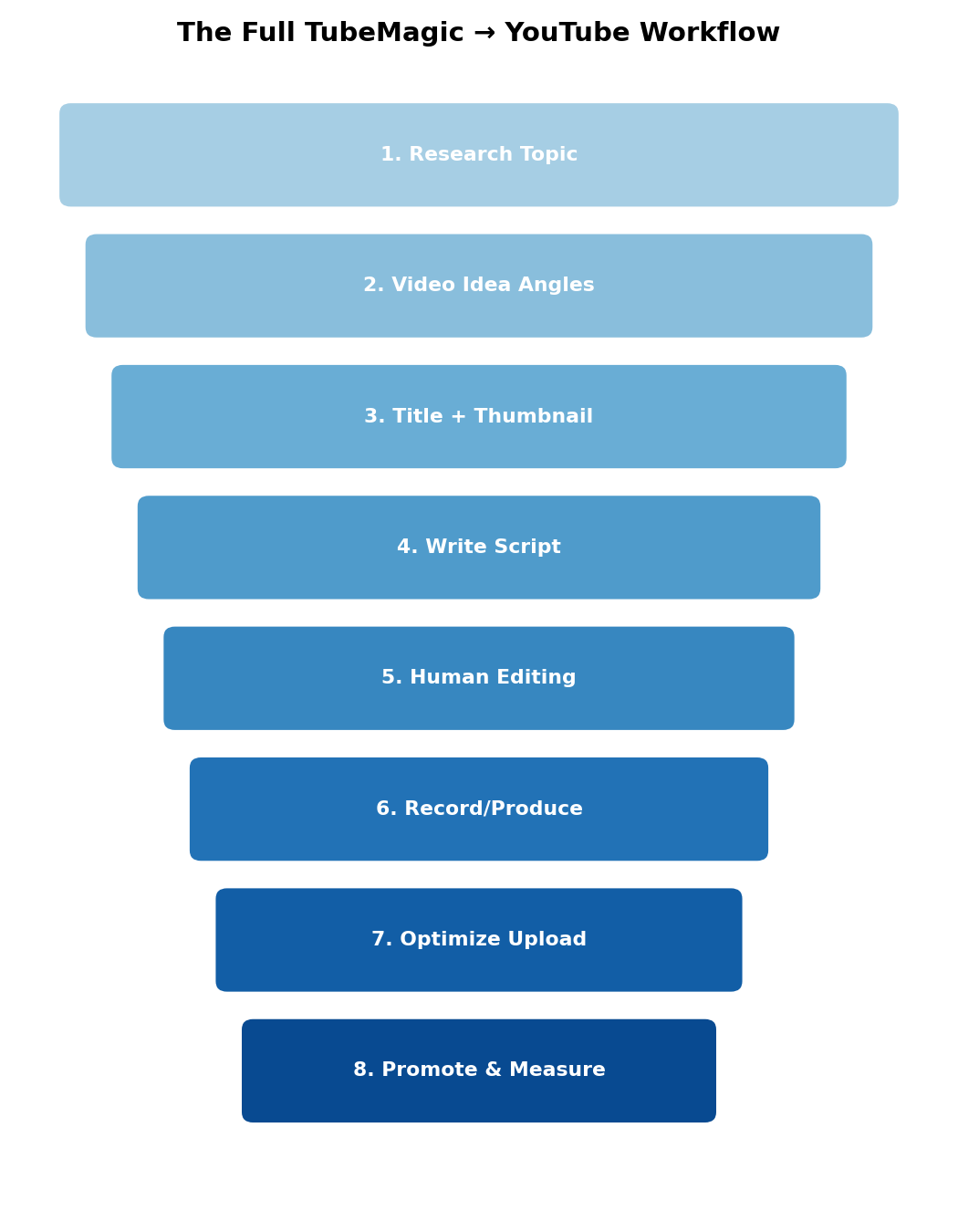
This is the realistic path from “I need a video” to “it’s live and I’m measuring results” — and it’s worth noticing that TubeMagic only covers steps 1-4 and 7-8. Steps 5 and 6 (human editing and actually recording/producing) are entirely on you. That gap is the single most important thing to understand about this tool before you buy it.
4. Is It Actually Worth $47/Month?
Here’s a comparison worth sitting with: a freelance YouTube scriptwriter typically charges $50-100 per script. If you’re publishing twice a week, that’s roughly $400-800/month just for scripts — before ideas, titles, descriptions, or tags.
📊 Chart: The Cost Math
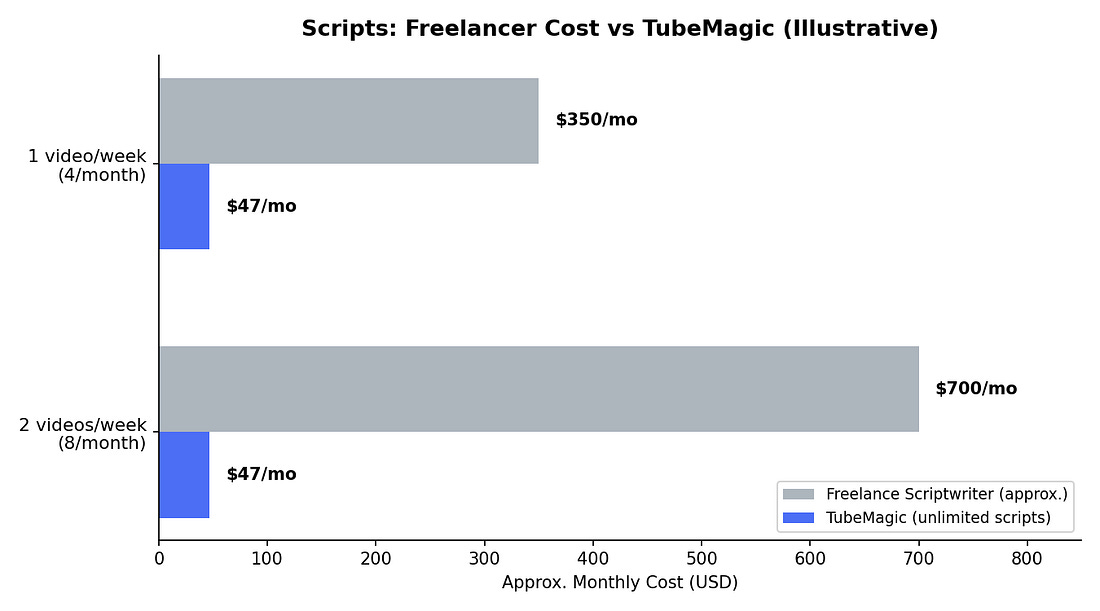
TubeMagic’s $47/month includes unlimited standard script generations. If you’re publishing consistently, the math genuinely favors the tool. If you’re uploading once a month as a hobby, that same math works against it — you’re paying for far more capacity than you’ll use.
Pricing, As of October 2026
PlanPriceWhat You GetPremium Annual$41/monthBilled at $497/yearPremium Monthly~$47/monthMonth-to-monthFree TrialNot availableDisabled due to spam abuseRefund30-day money-back guaranteeFull refund, stated by TubeMagic
Included: all tools unlocked, up to 100 standard generations per day per tool, 500 premium credits/month for stronger models, and 95+ language support for text-based features.
Who Should Actually Buy This
Worth it if:
- You publish at least 4-8 videos a month
- You consistently struggle with ideas or scriptwriting
- You run a faceless channel or manage multiple channels
- You need multilingual titles/descriptions/tags
Skip it or wait if:
- You haven’t built a consistent upload habit yet
- You’re hoping for a tool that creates the finished video
- You already have a solid workflow with Claude/ChatGPT plus VidIQ
- Your budget is genuinely tight and you upload rarely
The Honest Reality Check
TubeMagic can’t guarantee views, subscribers, or monetization — no tool can. YouTube growth really comes down to topic demand, packaging, click-through rate, retention, viewer satisfaction, and consistency, all working together. TubeMagic mainly helps with the first two and the research/writing grind around them. Your actual presentation, storytelling, and consistency still carry most of the weight.
5. 💰 Heads Up: This Newsletter Includes an Affiliate Link
Quick transparency note before we wrap up — I’m including my TubeMagic affiliate link in this issue through Digistore24, their official affiliate platform. If you decide to try TubeMagic after reading this, using my link costs you nothing extra, and it helps support this newsletter directly. I only recommend tools I’d actually suggest without the commission attached — this review was written the same way either way.
How I’m setting this up on my end (for anyone else running a newsletter who wants to do the same):
- Sign up for a free Digistore24 account at digistore24.com if you don’t already have one — this is their affiliate marketplace, separate from your TubeMagic account.
- Search for “TubeMagic” inside the Digistore24 marketplace — it’s listed there as a vendor product with an active affiliate program (commissions up to 50% have been reported by affiliates, though you should confirm the current rate on the listing itself).
- Click “Promote” on the TubeMagic listing — Digistore24 generates your unique affiliate tracking link automatically.
- Copy that link, and place it wherever you’d naturally mention TubeMagic in your content — a text link in the newsletter body, a “Try TubeMagic” button if you’re on a platform that supports it, or in your video description if you cover this on YouTube too.
Always disclose it — a short line like “This newsletter includes an affiliate link — if you sign up through it, I may earn a commission at no extra cost to you” keeps things transparent and is good practice (and required in most places, including under FTC guidelines in the U.S.). link is here 👇 https://tubemagic.com/ds#aff=88ra7023dae453
| POLLWhat’s the hardest part of making YouTube videos for you?Coming up with ideasWriting the scriptTitles/thumbnails that actually getJust staying consistent |
| POLLWould you pay $47/month for an AI tool that only handles research, scripts, and SEO (not the actual video)?Yes, if I’m publishing regularlyMaybe, want to try it firstNo, too expensive for what it doesNo, I’d rather do this myself |
COMING SOON NEXT TUESDAY , AI WORLD ‘

| [donate]
| Help keep news FREE for our readersSupporting your local community newspaper/online news outlet is crucial now more than ever. If you believe in independent journalism,then consider making a valuable contribution by making a one-time or monthly donation. We operate in rural areas where providing unbiased news can be challenging. |